contents
news
documentation
project home
at SourceForge.net
email
Documentation
The Suleiman main routine is this method:public SearchResult searchForDuplicates( Collection roots )
where roots is a collection of java.io.Files describing a set of directories. Each directory is considered a root for a Java package hierarchy. Also, every .jar and .zip file found under each of these roots is opened and processed. The resulting SearchResult object contains information about name clashes found between each source.
Example:
/users/myproject
  /src
    /br/com/mycompany/myproject...
  /lib
    jar1.jar
    zip2.zip
In the above example, if we invoke the method using as arguments two Files, one with "/users/myproject/src" and the other with "users/myproject/lib", Suleiman would detect if a class exists in both the expanded directory structure and inside any of the dependant libraries.
The class com.suleiman.Launcher
is a shortcut to convert a list of directories and feed them to the
above class. It is used like this:
$ java com.suleiman.Launcher /users/myproject/src /users/myproject/lib
When applying to a Web application, you would typically use
something like this:
$ java com.suleiman.Launcher $TOMCAT_HOME/webapps/myproject/WEB-INF/lib $TOMCAT_HOME/webapps/myproject/WEB-INF/classes
Clash Report
When Suleiman finishes, it uses the SearchResult object produced above and feeds it to a Velocity template which creates the HTML result. Using the Lancher example above, a file named suleiman-summary.html is created in the current directory containing each name clash detected.
NOTE: I am aware the
report-generating portion of Suleiman requires great refactoring. Not
only the resulting report is sometimes hard to read (especially if many
clashes were found), but it is cumbersome to deal with. I suppose one
of the first things to do when the project takes off is to straighten
this portion of the tool out.
At the present time, the generated report looks like this:
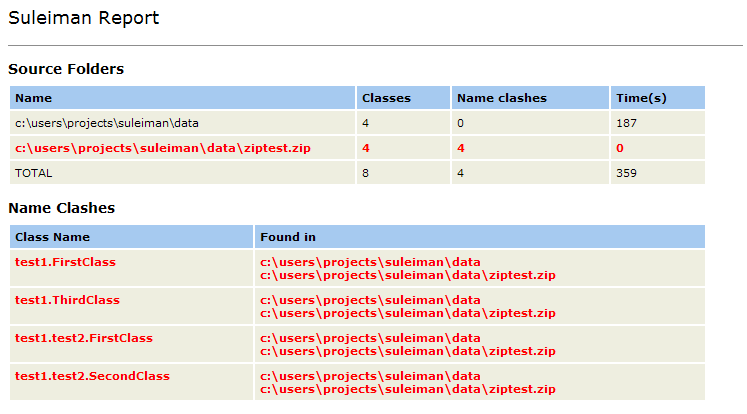
The top of the report lists each source folder or compressed
file that was processed. It displays the total number of classes in
that source folder, the number of these classes that collided with
classes in other sources, and the time it took to process this folder.
Then comes a detailed report that lists each name clash that was found.
In each of these clashes, we see the name of the duplicated
class/resource and the source folder or compressed file in which it was
found.
In the example above all classes are duplicated. They exist in their
normal, expanded directory form (c:\users\projects\suleiman\data)
but also inside a .zip file on the same directory (c:\users\projects\suleiman\data\ziptest.zip).
Suleiman has correctly identified these as name clashes.
copyleft 2005 -- errr, the Suleiman authors :)